Windows Memory Cleaner是一款用于清理和优化Windows系统内存的软件。它的主要功能是释放被占用的内存,以提高系统的性能和响应速度。
下载地址
Windows Memory Cleaner(内存优化软件) v3.0.4 中文绿色版
我用网盘分享了「WinMemoryCleaner」,点击链接即可保存。
夸克:https://pan.quark.cn/s/00bf9cc1b43c
百度:https://pan.baidu.com/s/1ZJZFGfKjC19Y8MiIEvnPFw?pwd=88in
软件功能
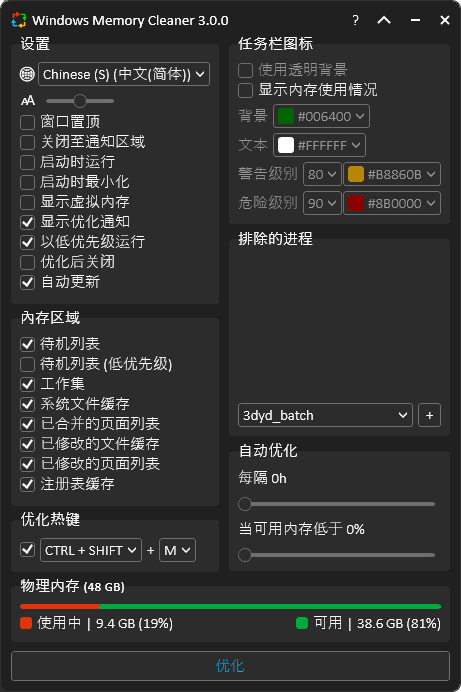
内存区域清理:可清理多种内存区域,包括组合页面列表、已修改页面列表、进程工作集、待机列表、低优先级待机列表和系统工作集,通过不同方式释放内存,如将未保存数据写入磁盘、删除进程缓存等。
自动化清理:支持定时清理,用户可设定间隔时间,如每小时清理一次;还能根据内存阈值触发清理,当内存剩余量低于设定值(如 20% 或 10%)时,自动开始清理内存。
进程排除:用户可将重要程序进程添加到排除列表,避免在清理内存时误删这些进程的内存,确保关键程序正常运行。
软件特点
轻量便携:单文件大小仅约 248KB,无需安装,可直接运行,便于携带,且不依赖第三方库或 DLL 文件,对系统资源占用极低。
操作便捷:提供快捷键操作功能,默认热键为 Ctrl + Alt + M,方便用户快速手动清理内存。同时支持最小化到系统托盘,托盘图标可实时监控内存使用状态,并用颜色区分内存负载。
智能高效:能使用本机 Windows 功能来清除内存区域,根据电脑实际内存情况灵活调整清理策略。清理完成后会通过 Windows 弹窗通知用户清理的内存量,还会通过 Windows 事件日志记录操作,方便用户查看。
兼容性强:基于Microsoft.NET 4 框架开发,适用于 Windows XP 及更高版本的多个 Windows 系统版本,还支持多种语言,方便全球用户使用。
更新日志
2025-11-17
Added a setting to set the color of the tray icon when optimization is running
Added a setting to trigger optimization to the tray icon using the middle mouse click (#141)
Added a tray icon rotate effect when optimization is running
Added support for European Portuguese (PT) language
Enhanced the run on startup feature for desktop and laptop computers (#137) (#139)
Fixed app crash after Windows hibernation (#145)
Fixed auto update (#148) (#151)
Removed unnecessary code related to package managers (Chocolatey, Scoop, and WinGet) due to a new strategy for package publication
UI & Code enhancements
Updated Arabic and Korean translations